This started with an idea.
Perhaps it would be interesting to create a family of type faces where the density of the characters was related to the frequency of their use. This font, to be called Densitas, would have variants based upon the text analyzed. For example, Densitas Shakespeare would use the collected works of Shakespeare for the character frequency corpus, while Densitas Brontë would use the works of the Brontë sisters for the corpus. For aesthetic purposes, perhaps the initial faces could be selected based on relevance to the source corpus as well.
What would this accomplish? It might reveal something interesting about the difference in usages between authors. It might end up being environmentally friendly by using less ink on more common characters. It might enhance readability. After all, it’s popularly understood that we tend to look at the shapes of words rather than the constituent letters. De-emphasizing the more common shapes may even make it easier to process text.
Any time I have an idea of this nature, I start thinking about code and design and try to avoid thinking about the end result. As my Father is wont to say, it is just as difficult to create something ugly as it is to create something beautiful. If I think too much on the end result, I will obsess over whether it will be worth the effort, and never get to the actual work. If I just dive in, I may find myself wasting a lot of time, but at least I will learn something.
This turns out to be one of those experiences. I thought it was an interesting idea. The end result is mediocre at best, dull perhaps, a waste of time. Still, I learned something in the process.
Step one was to write a character frequency analyzer. This code does a few things:
- read a text file
- compute the character frequencies
- scale the results across the frequency range, so the least frequent character has a value of zero and the most frequent character has a value of one
- map the characters to glyph names
- write out a chunk of code to substitute into the next step
The next step is a FontLab Studio/RoboFab script, hence glyph names instead of raw character names. Since FontLab/RoboFab scripts are in Python, I figured I’d write this in Python as well (I don’t really know Python, but that kind of ignorance never stops me from writing code).
I ended up with this program: cf.py
I ran it against the plaintext
The Complete Works of William Shakespeare from Project Gutenberg (after stripping out the Project Gutenberg-specific text, which I believe is permitted since I’m not redistributing the text, merely crunching it with code).
The FontLab/RoboFab script accepts two font sources, and interpolates each glyph according to the frequency computed in the previous step, where the less frequently used glyphs are darkest. For my test, I used the current state a sans-serif font I’ve been developing1. I have it in several weights, so I interpolated between the lightest and heaviest. The code to do this interpolation looks like shakespeare_weighter.py.
The results were unimpressive, to say the least:

(click to enlarge)
There are some of the obvious problems: distribution between is too stark; there seem to be only two or three densities. Similarly, kerning gets really disrupted by the different densities. But first things first. Why is the density contrast so extreme? Looking at the weighted frequency data answers that question:

For this chart, punctuation and other glyphs have been omitted.
So the next approach is to make the differences more gradual. Instead of doing by pure letter frequency, we use a gradient based on the ranking of frequency. In other words, the least common glyph is the darkest, the next least common glyph is one increment lighter, and so on, until the most common glyph is the lightest. This code to compute this looks like cf2.py, and the output distribution looks like this:

Looks more promising, does it not? We substitute the values into our FontLab/RoboFab script (like this: shakespeare_weighter2.py), and run it. Alas, the end results are still pretty dull:

(click to enlarge)
For the last try, we’ll do a few things differently. First, the thing that probably jumped out at you when you saw the first distribution graph: we’ll ignore all non-alphabetical characters when doing the frequency calculation. For the sake of readability, we’ll set all non-alphabetical characters to the median value. Secondly, we’ll take accented characters and consider them the same weight as their non-accented versions, so, for example, “á” and “ä” are the same density as “a.” Lastly — and this might be the big shift — we won’t interpolate between two weights of a font based on the frequency, but instead we will effectively halftone each glyph with a screen density based on the frequency.
To do this, we use the RoboFab halftoneGlyph() pen for inspiration. We do a much blunter approach: we impose a grid over the glyph, determine which points on the grid are inside, and replace those points with squares. The size of the squares is the same across a given glyph, and is based on the frequency. This process will then convert a nice, smooth glyph into a rougher, pixellated gray version of itself.
The revised frequency computation code is here (cf3.py), and the resulting frequency graph looks like this:

From this, we generate the final FontLab/RoboFab script (this one: shakespeare_weighter3.py), and run it.
And yet again, we look at the results, and sigh. All this work, and really nothing to show for it. There are a number of problems. The font stresses most rendering engines with its very high contour count, and either gets blurred into oblivion or converted into a plaid checkerboard nightmare when viewed on a display. The differences in shades are only apparent when the characters are enormous, even when printing. And, of course, aesthetically, it’s nothing to write home about.
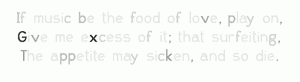
(click to enlarge)
The lack of results are dispiriting enough to resort to quoting that reprobate Thomas Edison: “Results! Why, man, I have gotten a lot of results! I know several thousand things that won’t work.”
I can’t claim to know thousands of things that won’t work, but I do have another handful to add to the collection.
1 The font will be released as WL Hope Grotesque, when and if I ever complete it to my satisfaction.


