Sat, 24 Jan 2026

Firewall

— SjG @ 5:13 pm

We were in the middle of watching a streaming TV show / SAG Award nominee, when the spinny wheel started up and the “TV” computer popped up a “network disconnected” message. I figured our new Frontier Fiber had disconnected, but the lights all looked good. Next to it, though, the Netgate firewall appliance had an angry blinking red LED. I plugged in a serial cable. Not good!
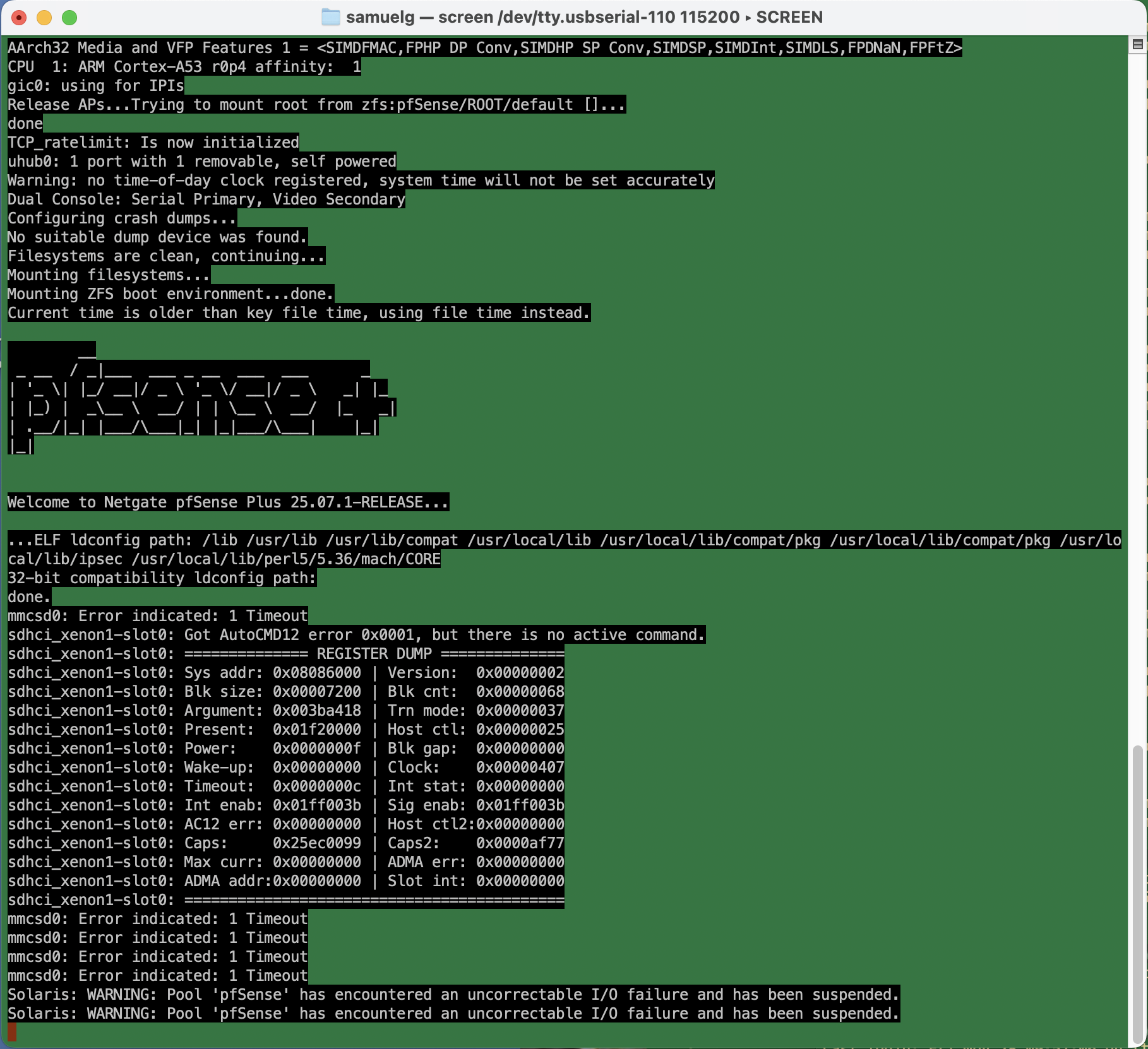
Uncorrectable I/O failure? Hm. This turns out to be an actual physical hardware error.

I’d bought this appliance before the start of the pandemic, so it was about six and a half years old. Shortly after I bought it, there was all sorts of drama with the company behind pfSense (not linking, but you can search) which made me wonder how trustworthy the whole thing was. And just a few months ago, when I ditched the cable modem for a fiber connection, the device had corrupted its entire configuration during a routine software update, and stupid-stupid-stupid … I hadn’t kept a recent backup of the config.xml. So I’d just been through the whole reconfigure process, which requires a hidden trick for VLANs on that specific device that’s not required on other hardware configurations, and which kept me befuddled for many hours more than I’m willing to admit.

The storage RAM on the SG-1100 is soldered on, and it’s beyond my ambition to try to replace it. Instead, I ordered a new piece of hardware.

On this new device, I figured I’d try the OpnSense fork of the firewall software on the assumption that I’d be mostly familiar with it. Well, that’s partly true. The web-based configuration is reorganized. Some things require fewer steps, but they weren’t immediately obvious to me. Dammit Jim, I’m a code monkey, not a network engineer.

Anyway, I spent today restoring my network. It’s not all that complicated. I have a LAN, an isolated guest network, an isolated “internet of things” network, and VPN access from outside, all with special sets of rules to allow or prevent access, depending.

It was pretty smooth. A few gotchas that tripped me up whether reasonable or not:

  • ddclient. I use this for pushing my dynamic IP address to the primary DNS provider for a domain, so I can have name-based access to the home network. It kept failing. Eventually, I had to log in to the firewall, and manually edit the configuration file to place quotes around my password. There’s probably some vulnerability in there if it’s passing unescaped strings to the command line — although you already need credentials to get to the interface that would allow it.
  • Firewall rules in OpnSense have a “direction” which I don’t remember in pfSense. So when I want to firewall off connections from the Guest network to the LAN, for example, I have to put an “inbound” rule on the Guest network blocking the traffic. “inbound” means that the traffic is blocked when coming to the firewall (I had foolishly thought it was “outbound” to the LAN network). Since rules are specified on interface, network, and can specify both source and destination, I’m not sure why direction is required.
  • I created and deleted a VPN instance early in the process. There’s still a tab in the firewall rules area, and automatically generated firewall rules for it, even though the instance has been deleted and has no interfaces. I don’t think it’s a big deal, but it’s confusing.
  • So. many. DHCP. options. There’s the default “Dnsmasq DNS & DHCP”, there’s also “ISC DHCPv4” and “ISC DHCPv6”, and “Kea DHCP.” For my little network, I could do everything in the default, just creating separate DHCP ranges for each interface.

Setup wasn’t so bad. I’ll doubtless gripe here if things don’t work the way I want them to.

Mon, 19 Jan 2026

Tue, 26 Aug 2025

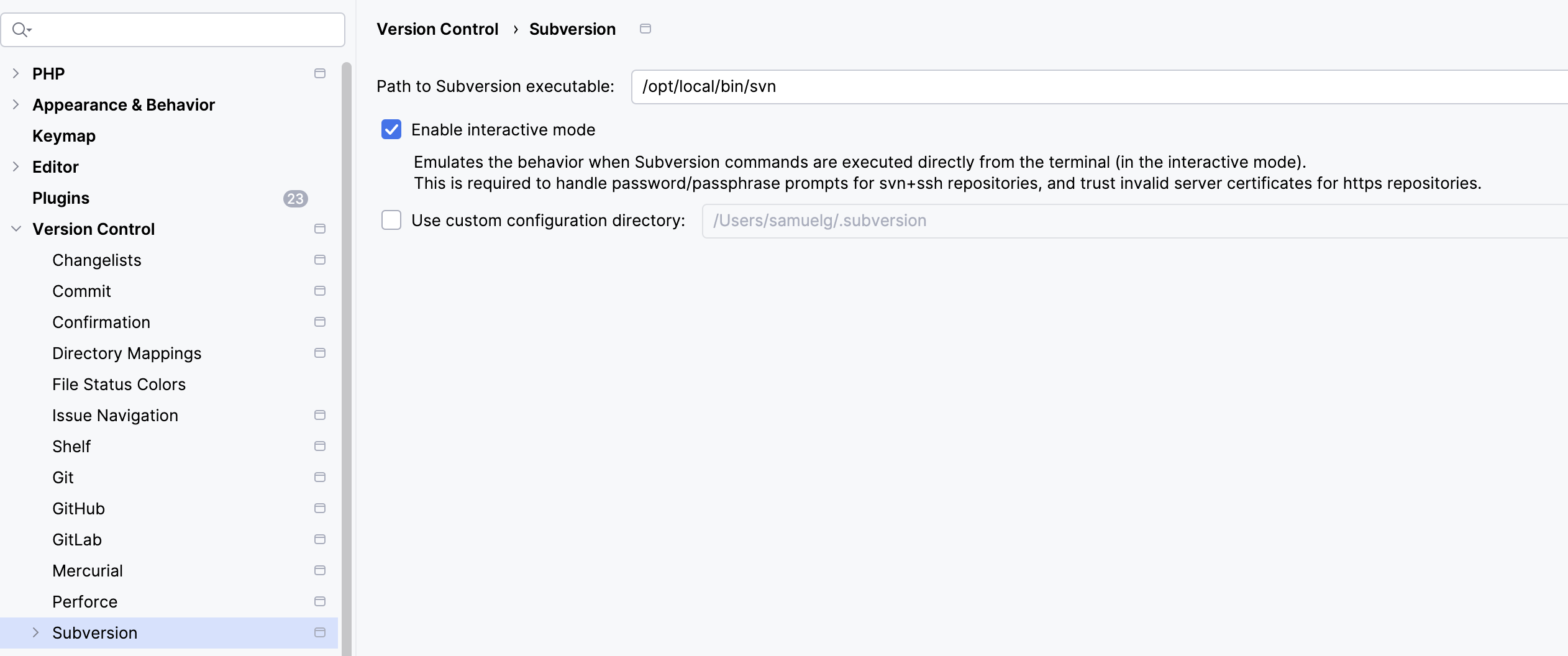
PHPStorm/svn stall again, note to future self

— SjG @ 6:41 am

Every time this happens, I get confused and lost, and have to rediscover the solution. So here’s a note to future self.

Symptom: PHPStorm stalls on an SVN update, and sits there doing nothing. Network is OK. SSH into server that supplies SVN, watch the WebDAV logs, and there’s nothing even trying to talk to it.

PHPStorm is configured to use an external Subversion client.

Solution: Don’t (necessarily) go and mess around with the settings for PHPStorm. Open a terminal, go to the working set in question, and do an “svn up” from the command line. This is where you’ll discover that SVN has either identified the server certificate as expired or updated, and it’ll ask you to approve the certificate (in that latter case). Log in with your credential again. Now it’ll all be OK again.

Thu, 19 Jun 2025

WordPress stupidity

— SjG @ 7:08 am

So, it was another plugin-gets-updated-and-the-site-crashes situation. It’s not exactly the fault of the plug-in. It’s WordPress being stupid about security.

As I wrote back in 2019, I have WordPress automatically updating itself and its plugins using a cron job that uses the magical Word Press CLI. Notably, this update process runs as a different user than the web server. This is by design. I want to minimize the number of directories where the web server has write permissions — especially, I don’t want it being able to write in the directories containing code. This is kind of basic stuff. If someone can abuse a bug in the core or a plugin to write a file in the web tree, they could do all sorts of mischief even without escalating privileges. Denying the web server write access to those areas is a simple mitigation that prevents a whole class of attacks.

WordPress, however, was written with the belief that it should be able to write files wherever it damn well pleases. The idea is a naïve user gives WordPress full write access on their server, or their FTP credentials to their host, or their ssh username and password [!!], and then a lot of functionality is simplified. Once the web server has privileges to write everywhere, it’s easy to give the user the ability to install, update, edit, and remove plugins and themes directly from the web interface. Very convenient! Especially if you don’t have trust issues like I do.

Now, because of the way content is uploaded and plugins work, there are always going to need to be directories where WordPress has write access. That’s fine. I can protect some of those from being a problem by setting directives in the web server to prevent code execution.

There’s a lot of infrastructure to support WordPress’ profligate write permissions. One component of this is an internal function WP_Filesystem that creates a global abstraction of the filesystem. Once that function is called, plugins or themes or whatever can call methods on the global $wp_filesystem variable to interact with the filesystem, while behind the scenes these interactions could be directly, over FTP, over ssh, or other protocols, depending on how the system is set up. Instead of calling file_put_contents(...), for example, the plugin author calls $wp_filesystem->put_contents(...), and doesn’t have to worry about the details of which protocol is used.

The WP_Filesystem function works by calling the function get_filesystem_method in wp-admin/includes/file.php, which tests different ways of writing files. Here’s where I got screwed. To see if it can write directly to the filesystem, this method tries to write a temporary file, and if this succeeds, checks the ownership of the created file. It compares that to what it considers the WordPress file owner, which is determined by looking at the ownership of wp-admin/includes/file.php. If that fails, it moves on to the next protocol.

So in my case, get_filesystem_method didn’t think it could access the filesystem directly, because wp-admin/includes/file.php was not owned by the web server user. So it moved on to try to update via FTP, ssh, etc, and all failed. It then gracefully threw an error that took down the whole site.

Now the question is why this plugin update needed write permissions anyway? The files making up the plugin were installed successfully by my upgrade script. It turns out that the plugin had a new stylesheet in an scss file, and on the first run it was trying to compile it. I’ll grant that that’s a reasonable case. But the directory where it wanted to put that compiled css was writable! It just never got to that point, because of the abstraction layer.

The slightly ridiculous solution to this problem was to change the ownership of
wp-admin/includes/file.php to the web server user, load the main page of the web site to let it generate the css, and then change the permissions on that file back. Stupid, stupid, stupid.

Wed, 21 May 2025

Mediocrity Machines: Ramblings on AI and Ideas

— SjG @ 6:14 am

The “AI” hype these days is inescapable, particularly with Large Language Models (LLMs) that have impressive ability to create images, generate plausible text, and do everything from answering your tax questions to writing your code for you (of course when it comes to accuracy, caveat emptor)! There’s plenty of controversy about the training of these LLMs, discussed by wiser folks than me. People point out that 1) the training sets are often pure plagiarism, 2) the output of these systems reflect the biases of the training sets, and 3) the aforementioned accuracy problem. There are plenty of places to read about those concerns elsewhere.

Thing that has been bothering me about AI lately is that it is, structurally, something of a mediocrity machine.

To explain this, I first need to describe a particular type of person I’ve encountered numerous times in my career. I’ll do this by focusing on one former boss I had who best exemplified the character of what I call the “Idea Guy.” For the sake of anonymity and convenience I’ll call this prior boss “Steve.” In fact, I took the term “Idea Guy” from Steve, since that’s how he described himself and the captains of industry he admired.

Now, there are some industries and times where a single instance of great luck or skill can make you — for example, if you were an A&R person in the ’70s and you discovered a band that went platinum, or if you were a stock broker and bought a lot of Apple in 2016. In some ways, it’s not unlike betting on horse races. It’s very difficult to differentiate between skill and luck in these circumstances. If there’s repeat performance, and you repeat those successes, that might give some indication. But the world is a noisy, random place, and the conditions for these big wins are only rarely available, even highly skilled people don’t tend to have more than a few big wins.

In any case, Steve was a guy who had had one enormous win (and a string of smaller, less lauded failures which were always someone else’s fault), and was therefore utterly convinced of his own brilliance. He regularly had profound insights into what the world needed, and if he could only get people to implement his visions, he’d change the world. I was hired on as one of the people to implement these visions.

It was a peculiar job. One aspect of being an Idea Guy is that the details are beneath you. And if the details are beneath you, then the people who worried about details were also tremendously inferior to the people who had Ideas. Steve would regularly parade investors through the facility where I worked, and proudly wave his hand over my department. “These are my nerds,” he’d smirk. “They deal with the mundane part of things.”

Let me go on an aside about the “mundane” part for a moment. One of these projects involved a web-based calendar system. Steve had online events that he wanted to enter into the system which would appear to end users. He called me into his office one day to yell at me because one of his friends had looked at a prototype of the system and had been very critical. This friend was a designer who wanted everything to be super minimalist, so he told Steve that the registration form had too many fields: “It should only have three: name, email, and password.” Steve demanded to know why I required other details. I explained that we needed the user’s year of birth because events were age-restricted, and we needed their time zone so we could display the event time to them correctly1.

Steve flew into a rage. “You nerds always make things so complicated! Get rid of everything but name, email, and password!” I tried to explain again but Steve wouldn’t listen. Eventually, he said “do it my way, or I’ll find someone else who will!” I ended up being reassigned to a different project, and the calendar task was assigned to “Kent2,” a junior programmer. Kent was bright, motivated, and very inexperienced. He came up with some complicated scheme based on a complete misunderstanding of how IP addresses work and the Internet Time Service, built it, and reported to Steve that it was done. Steve smugly announced to me that the problem had been solved — he just had to get “the right nerd on the job.” He pointedly said that if I didn’t learn to listen to him, I’d be replaced by more compliant coders.

The fact is, details matter. Needless to say, the deployment of the site was a disaster, and it wasn’t long before I left Steve’s company.

Most LLM programs are like that junior programmer, “Kent.” They come up with something that looks like a solution. You tell them what you want to solve, and they use pattern matching to find a solution that seems the most similar to problems like the one you’re describing. They don’t have any understanding of what’s going on. If the problem is close enough to one they’ve seen, the solution may well work. But if the problem is significantly different, or the way you describe it is different than other people have described it, you’ll get a solution that looks right … but probably isn’t. You can then correct the LLM, and it’ll apologize, and try again.

Like Kent, the LLM will generate something that looks like it will do what you tell it, whether it makes sense or not. If you’re like Steve, and have contempt for the people who get caught up in details, “AI” is perfect because it won’t argue with you. It’ll just go ahead and come up with something. The kicker is the more that what you’re doing is like stuff that’s been done before, the more likely it is the solution you’re given will work. To say that in a different way: the more original the idea or approach, the less likely the solution will work.

Now, in a lot of cases, the average is a good target. For basic building blocks, using a tried-and-true approach makes sense. A programmer shouldn’t reinvent sorting algorithms every time they want to sort something (which is why there are libraries). And a programmer probably shouldn’t ever invent an encryption algorithm.

Here’s where the Idea Guy jumps in and says “Yes, my brilliant original idea is the key, and the details are mundane so should be handled by nerds who know that sort of thing.” But this requires knowing how to break down the so-called brilliant original idea into the constituent mundane components in order to implement it. It requires understanding details like “I can’t present a time to someone correctly unless I know their time zone.”

Anyway, the more original and novel your idea, the less likely it is that the LLM will be able to put together the details correctly, and the more your idea resembles ideas that have been integrated into the training data, the more likely it is to succeed. So when you have the idea for the Next Great Thing, if your LLM can build it quickly and accurately, it probably means your idea isn’t very original. So you can probably get it to build your “Facebook but for pets” or “DoorDash, but for weed delivery,” but not for … well, I’d best not reveal The Greatest Idea Since Sliced Bread here.

1This was in the days before you could reliably use JavaScript to detect time zone.

2Not even remotely his real name.